

Upgrade or Downgrade
- Upgrade your plan depending on your needs.
- Switch to yearly billing: automatically save 20% by paying annually instead of monthly. Your subscription will update immediately, and the new billing cycle will apply from your next payment.
Downgrades between plans aren’t available. To switch to a lower tier, simply cancel your existing subscription and re-subscribe to the plan you prefer.
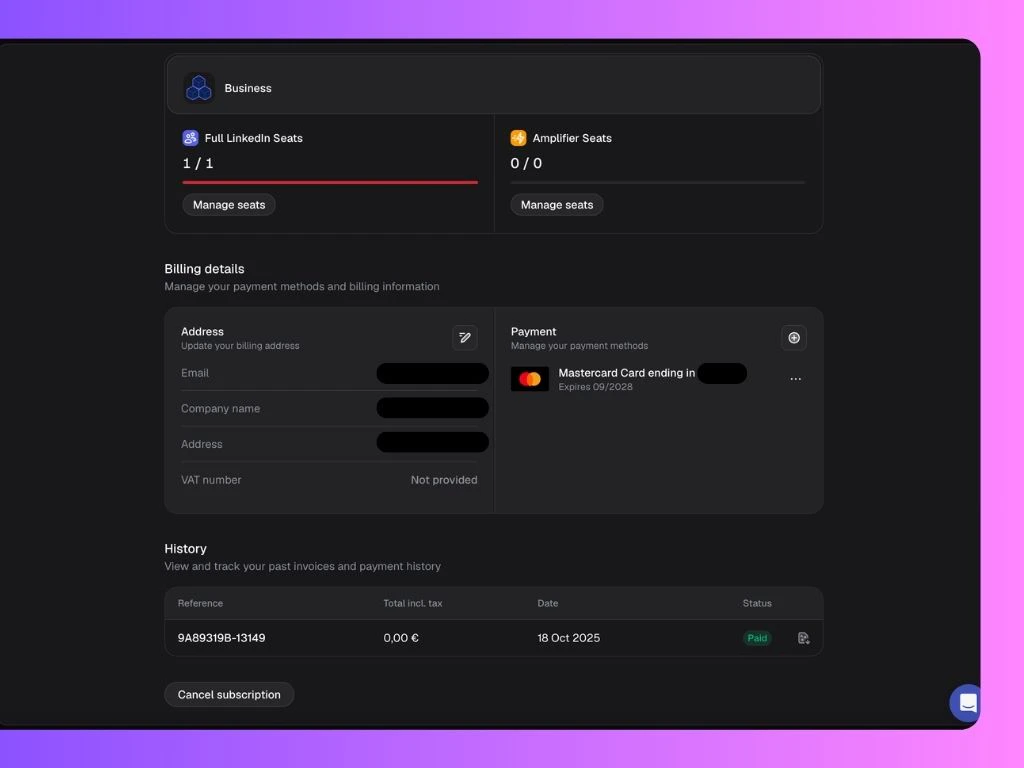
Manage Subscription
If you’re on the Advanced or Business plan, you can manage your subscription anytime through Manage Seats — where you can add or remove Full LinkedIn Seats and/or Amplifier Seats as needed.The prorated charge for your change takes effect immediately.
Manage Payment Methods & Billing Details
Under Billing Details, you can view and manage the billing address and all payment methods linked to your account. If you have more than one payment method, you can set one as the default.Updates on billing address will only apply to new invoices.
Access and Download Past Invoices
- Under Invoice History, you’ll find a list of all your past invoices.
- Click on the invoice you want to download.
- A new page will open where you can click Download Invoice to save it.