

- They receive 4 weeks of Scripe for free.
- You earn 20% lifetime commission on every subscription payment they make.
If you’d like to take things a step further and become an official Scripe Partner (integrating Scripe into your own offers, services, or client systems) you can apply to our Partner Program here.As a partner, you’ll get access to exclusive resources, co-marketing opportunities, and higher commission tiers.
Where to find your referral link
To find your referral link, go to your Workspace Settings → Referrals. In this page, you’ll find your unique referral link.- Click Copy link to copy your link to your clipboard.
- Share it anywhere: LinkedIn posts, DMs, newsletters, WhatsApp, etc.
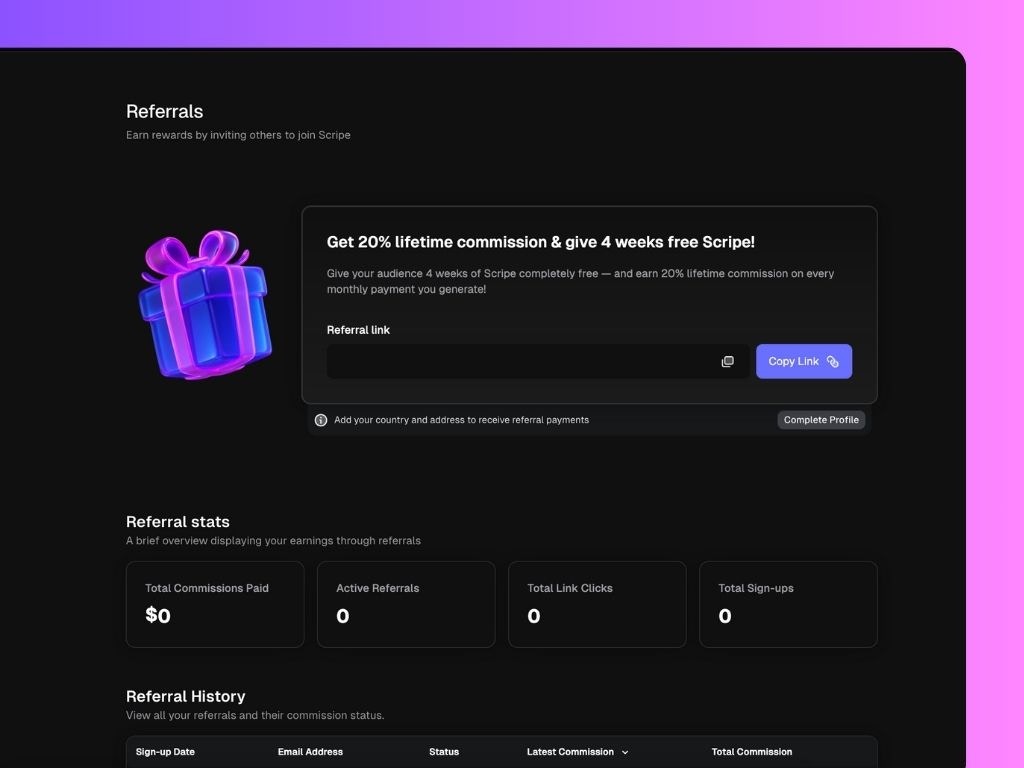
Add Payment Details (so we can pay you!)
Before commissions can be paid out, Scripe needs your payout information. On the Referrals page, click: Complete Profile → Add your country and address to receive referral payments. Once completed, you’ll receive an email (via Dots) to set up your preferred payment method.You only need to do this once — after that, all payouts will be automatically transferred to you every month.
Referral Stats Overview
Below the referral link, you’ll find your Referral Stats.- Sign-up Date: When the referred user created their account.
- Email Address: The email address associated with the referral.
- Status: Trial, Active, Canceled, etc.
- Latest Commission: Most recent payment attributed to that referral.
- Total Commission: Total amount earned from that referral so far.
You can email hello@scripe.io if a referral hasn’t been correctly attributed to your account.